
You are using an out of date browser. It may not display this or other websites correctly.
You should upgrade or use an alternative browser.
You should upgrade or use an alternative browser.
Unlock Bios Password Lenovo Thinkpad E14 (NM-C421) BIOS Unlock
- Thread starter Sparky
- Start date

Reputation:
Dear Admin,
I have attached a locked BIOS file of my lenovo thinkpad E14. Is it possible to unlock the bios password from the BIS file?
Laptop Model: Lenovo Thinkpad E14
Motherboard: NM-C421
BIOS File is attached as ORIGINAL_BACKUP.BIN.
Thank you.
Attachments
Thank you.
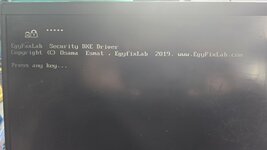
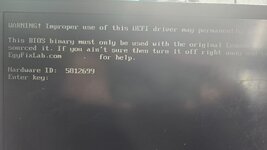
I have programmed this patched bin file to the chip and booted the system, the password is still there and when I type any letters and press enter then this screen comes ask to press any key. After pressing any key it ask to enter the key shown with a Hardware ID. Is there anything else I need to do? Please advise.
Please check images
Kind regards
I have programmed this patched bin file to the chip and booted the system, the password is still there and when I type any letters and press enter then this screen comes ask to press any key. After pressing any key it ask to enter the key shown with a Hardware ID. Is there anything else I need to do? Please advise.
Please check images
Kind regards
Attachments

Reputation:
"Instructions for use"
Remove all battery and CMOS battery
press F1 to enter setup: password 1234
wait 20sec or more.
Enter any ID to hardware Id.
Press 2x space bar when asked.
Turn off the computer.
and restore your original bios .
Enjoy.
If 2x 5beep, it's normal.
I didn't do checksum but it must light up anyway.
Wait minimum 30sec before screen logo light on. Must turn on/off several times by itself.
Remove all battery and CMOS battery
press F1 to enter setup: password 1234
wait 20sec or more.
Enter any ID to hardware Id.
Press 2x space bar when asked.
Turn off the computer.
and restore your original bios .
Enjoy.
If 2x 5beep, it's normal.
I didn't do checksum but it must light up anyway.
Wait minimum 30sec before screen logo light on. Must turn on/off several times by itself.
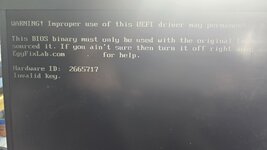
It says Invalid Key. Plz see the image."Instructions for use"
Remove all battery and CMOS battery
press F1 to enter setup: password 1234
wait 20sec or more.
Enter any ID to hardware Id.
Press 2x space bar when asked.
Turn off the computer.
and restore your original bios .
Enjoy.
If 2x 5beep, it's normal.
I didn't do checksum but it must light up anyway.
Wait minimum 30sec before screen logo light on. Must turn on/off several times by itself.
The laptop is only on ac adapter. No CMOS battery and the laptop battery is connected.
Attachments
Reputation:
you should disconnect the battery while the process
The battery is disconnected. I am using only adapter to do this process. Is there anything else I am missing? not sure.you should disconnect the battery while the process
Reputation:
then i think you doing ok
please do the instructions carefully
please do the instructions carefully
Who is viewing this thread?
There are currently 0 members watching this topic
Users who has read this topic
Sparky , Salimeh Bolboli , Vahab Hemmati , Admin , WolfBR82